
Connect Telegram
Anello delivers bot alerts through one shared Anello bot on Telegram. You don’t create anything — you tap Connect Telegram in Anello, it opens a chat with the bot, you press Start, and that chat is linked to your account.
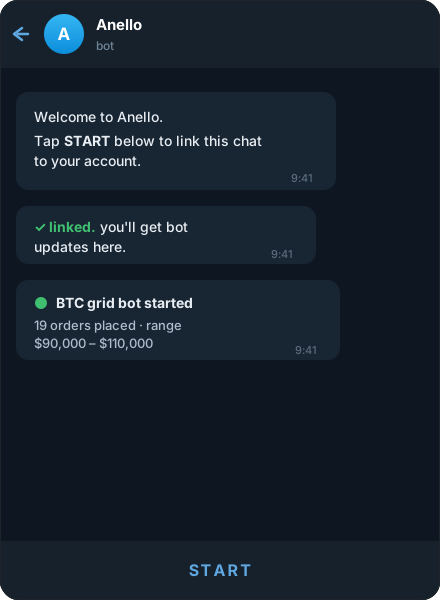
Link your chat
Section titled “Link your chat”-
In Anello, open Notifications and choose Connect Telegram. Anello generates a one-time link like:
https://t.me/AnelloBot?start=Xy7… -
Open the link. Telegram launches a chat with the Anello bot and shows a Start button along the bottom.
-
Tap Start. Telegram sends
/startplus the one-time code to the bot. -
The bot replies in the chat:
✅ linked. you’ll get bot updates here.
That’s it — alerts now arrive in this chat.
The flow at a glance
Section titled “The flow at a glance”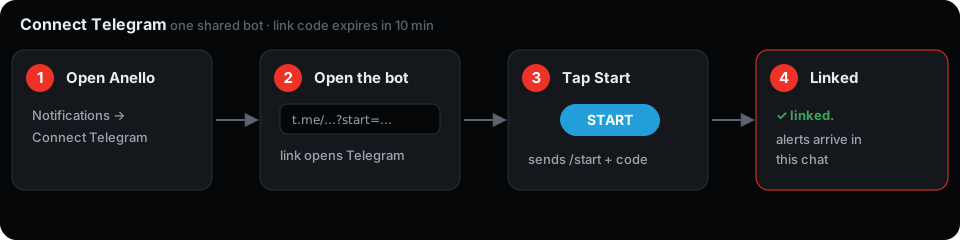
How it works
Section titled “How it works”The start= value is a short-lived token tied to your Anello account. When you tap Start, Telegram tells the bot which chat you’re messaging from; the bot matches the code to your account and stores that chat as your alert target. The code is single-use and discarded the moment you link.
Every event goes to Telegram by default. Toggle them per channel under Notifications → routing:
- Bot started / Bot stopped
- Order placed
- Order filled / Order partially filled
- Agent wallet expiry warning
Delivery is best-effort: if Telegram is briefly unreachable, that one alert is dropped rather than retried, so a notification hiccup never holds up your bot.
Bot commands
Section titled “Bot commands”In the chat with the Anello bot:
/start— link this chat (use the link from Anello so it carries your code)./disconnect— unlink this chat; Anello stops sending here./help— show the command list.
Disconnect
Section titled “Disconnect”Send /disconnect to the bot, or open Notifications → Telegram in Anello and choose Disconnect. Either one stops delivery; reconnect any time with a fresh link.